How to Calculate Profit as an Amazon Seller in India 2026


In 2026, being an Amazon seller in India presents numerous opportunities that can significantly boost your profitability. But many sellers still struggle with their Amazon seller profit calculation. The assumption that high sales equal high profit is not always true. Although high sales numbers may look promising and impressive, your cash flow can still feel unpredictable, the common reason being that many seller focus on their revenue instead of calculating actual profit. Between GST, Amazon fees, returns, hidden costs, etc., your profits can be way lower than the set expectation.  

Whether you work individually or with an Amazon marketing agency, knowing your real profit is very important to make certain decisions related to your expenses. In this blog, we are going to learn about every cost involved and break them down to explain how to calculate profit on Amazon India.

Why is Profit Calculation Important?

Amazon is a very competitive marketplace. To survive on this platform, it is essential to be well aware of your numbers. Not knowing your profits can lead to many wrong decisions about important business aspects, which can hurt your business, such as:

  • Overspending on Amazon advertisement 
  • Sell products with low or negative margins
  • Discounts or coupons can lead to loss
  • Lose money on returns and storage

With a proper knowledge of your net profits, you can understand the Amazon seller profit margins in India and can confidently scale your business by making well-informed decisions.

Common Profit Calculation Mistakes

  • Ignoring Discounts and Coupon Offers
  • Using MRP instead of the selling price
  • Not excluding GST from the profit
  • Forgetting about returns and refunds
  • Not accounting for advertising expenses
  • Including Amazon FBA reimbursement
  • Not accounting for storage costs

Steps to Calculate Accurate Net Profit –

Step 1: Start with the product’s Selling Price 

To calculate the profit correctly, it is necessary to use the actual selling price of the product. Many people make the mistake of using MRP. If you run discounts, coupons, or promotions, adjust your selling price accordingly. Many sellers miscalculate profit by using the listed price instead of the final value at which the product is sold.

Step 2: Deduct Amazon Selling Fees

Sellers selling on Amazon know that it charges many fees from them; subtracting those fees from the selling price is an essential step in calculating net profit. Listed below are the fees that should not be accounted for during profit calculation:

Referral Fee

A percentage of the selling price based on the category of the product. 

For example, 10 per cent of  ₹1000 = 100

Closing Fee 

This is a fixed price that is paid on every unit sold, depending on the price slab. 

Fulfillment Fee 

This fee is for the seller who uses Fulfilled by Amazon. Amazon FBA profit calculation must include:

  • Pick and pack fee
  • Weight handling fee
  • Last-mile delivery

Step 3: Calculate COGS

Calculating COGS helps in understanding the cost of goods sold.

It includes:

  • Cost of manufacturing the product
  • Amount spent on packaging and labelling
  • Quality check cost
  • Transportation to the Amazon warehouse expense

Not accounting for these costs can lead to inaccurate net profit calculations.

Step 4: Subtract GST and TCS

Many sellers misunderstand GST as profit and don’t subtract it while calculating profit. GST collected from customers goes to the government and thus is not a profit. Also take into account TCS, which Amazon deducts at 1 percent. 

Step 5: Add Advertising Costs

Considering the competitive nature of Amazon, spending on advertising is not an option anymore. It is important to exclude the ad cost from the selling price.

Exclude the cost of all types of ads you ran:

  • Sponsored Products
  • Sponsored Brands
  • Sponsored Display

Step 6: Include Returns and Refunds

The return of a product sold directly impacts profitability. Excluding the return impact per unit makes the net profit more accurate. 

It includes:

  • Refund amount
  • Reverse shipping charges
  • Damaged inventory

Step 7: Storage and Long-term Fees

For sellers availing the fulfilled by Amazon service, storage cost cannot be avoided. 

It includes:

  • Monthly storage expense 
  • Long-term storage penalties for slow-moving inventory. 

Step 8: Account for Amazon FBA Reimbursement]

Amazon has an FBA reimbursement policy, which pays the seller for any:

  • Lost inventory
  • Damaged Products
  • Shipment Issues

Although this policy compensates for your loss, it is not necessarily a profit, but should be tracked separately.

Step 9: Add Operation Costs

Including expenses beyond fees charged by Amazon is essential to calculating Amazon Seller ROI in India.

It includes:

  • Software and analytics tools
  • Amazon marketing agency fees
  • Salaries of employees

Step 10: Calculate the Net Profit

Taking all the above-mentioned costs into account and following the steps correctly, calculate your net profit by subtracting them from the selling price of the product. 

Conclusion

Sellers who are succeeding on Amazon are not only good marketers, but also have a good hold on their business numbers. Being aware of your profits, expenses and costs allows you to price your products correctly, reduce unnecessary costs and grow the business with the practices that suit it the best.   

Assuming good sales mean good profits can prove to be a costly mistake in future, which is why it is important to have profit clarity. Accounting for all the costs helps you gain a fresh perspective and clear visibility into your business health, which enables you to fight your competitors and grow your Amazon business with full control. Reach out to HRL Infotech for proper guidance and cal

How to Scale Your Amazon Business with International Marketplaces: Unlock Global Growth


As an Amazon seller, your business growth potential is enormous, particularly in international marketplaces. Growing your Amazon business internationally offers fantastic prospects for visibility enhancement, customer capture, and business growth. If you’re considering expanding to international Amazon marketplaces, you’ve come to the right place. This guide tackles how to sell successfully on Amazon in other countries and scale your business through integrated international selling on Amazon strategies.

1. The Benefits of Expanding Your Amazon Business Globally

Selling internationally on Amazon is an incredible opportunity and comes with numerous benefits. By extending your business to several Amazon marketplaces, you promote your business, access new customers, and significantly increase your revenue and profit streams. You are not limited to selling in your country since you can easily take advantage of the different markets in the world that have a high demand for your products.

Having a business in multiple Amazon marketplace countries increases your business profits and lowers the economic risk of a downturn in one country. Expanding to various corners of the world will increase your brand exposure, which will, in turn, improve your business as a whole. Selling in other countries will enhance your financial safety by helping you avoid fluctuating seasons in your local market.

2. Understanding the Logistics of International Amazon Sales

Understanding logistics is crucial in planning expansion around the world. For taxes, you need to know the shipping and customs border for each region. Luckily, Amazon does and ships internationally. They provide logistics internationally through Fulfillment by Amazon FBA.

When selling on Amazon platforms in different countries, Amazon’s global selling programs can ease and improve processes on your end. Other than that, faster fulfillment is better through localized options. This is one of the most crucial Amazon international sales tips: free is better. Shippers who charge more than the average Amazon customer rarely repeat orders.

3. Choosing the Right International Amazon Marketplaces for Your Products

Choosing the right Amazon marketplaces for business expansion is critical, as it can make or break your business. Highly populated markets have buyers, and demand is well known. Amazon UK, Amazon Germany, and Amazon Japan all have different behaviors, regulations, and preferences.

Find which Amazon marketplaces best suit your product types. For example, while selling tech products, you should focus on the US and Germany. In contrast, fashion products are likely to sell best in the UK or France. This will provide you with a better Amazon marketplace opportunity. From the researched audience, this is a better Amazon marketplace opportunity.

4. Setting Up Your Amazon Seller Account for International Expansion

It’s time to set up your Amazon global selling account. For this stage, you already know the international Amazon marketplaces you plan to sell on. Amazon centralizes the management of listings for different countries and regions under a single account for seamless expansion of the seller’s account, reducing the hassles of expansion.

As a first step, you need to make changes to your account settings and select the regions from which you wish to operate. Each area will have its own marketplace, and your selling guidelines will vary, so make an effort to find the selling guidelines you need. To receive payments in your preferred currency, buyers will need to pay you for international selling accounts.

5. How to Expand Your Amazon Business Internationally: Key Strategies

As with any expansion into a new market, expanding internationally requires a differentiated approach. One of the most crucial seller strategies on Amazon’s global market focuses on localization. This involves modifying product listings, descriptions, pricing, and marketing to the needs and expectations of each area. For instance, in the US, product descriptions focus on certain things. However, if the target audience is France or Japan, the descriptions may need a complete rewrite.

Pricing also plays a vital strategic role. Since the world is made of many independent nations, each with its own set of variables that affect pricing, it is essential to set a price that is competitive but also within a desirable profit margin. The ideal price will take into account competitors and the buying power of consumers in each market. There is also the option of running free or discounted prices in the target markets to encourage buyers to make purchases.

6. Amazon International Selling Strategies: How to Leverage Reviews and Feedback

Trust and credibility are hard to build, and this is one crucial challenge that any company will face when branching out to new countries. Every country is different, and their approach to online retailers is also different, but customer reviews significantly influence their buying decisions. Most of these consumers will have a low buy-in to an unknown seller.

To mitigate this concern, strategies should be considered to gain positive reviews from all platforms and marketplaces. Set an after-purchase strategy for soliciting feedback from customers and attend to any problems customers point out. Run international Amazon Advertising to increase visibility and reach, which may also help you gain reviews and ratings from new customers.

7. Optimizing Listings for Global Amazon Marketplace Expansion

Any business must succeed in any part of the world to have export control. Amazon product listings are customized for each target market’s language. You may begin by capturing the Amazon listing and translating the product title and item description to each target market’s local language. This will increase the chances of customers capturing your product listing.

Clearly, this positive visibility will result in increased positive palpable reviews. While this ascertains the customer’s product experience is positive, it is equally essential to include targeted market keywords in the listing. Consider editing the listing to include link-building keywords to increase visibility in local search results. Remember, Amazon will still compare language, customer intent, and product meaning from the product description.

8. Handling International Payments and Currency Conversions

Managing international payments is complicated, especially when selling on different Amazon platforms in other currencies. Luckily, Amazon makes this easier through the Amazon Currency Converter for Sellers. This tool enables you to convert your sales profit to your country’s currency without hassle.

Just remember that there are costs for each conversion. If you are selling in numerous countries, these costs could add up, especially in significant sales. To mitigate the payment conversion costs, an international business account and a third-party payment processor are suitable.

9. Analyzing Performance and Scaling Your Global Amazon Sales

After you have mapped out your presence in different countries, it’s essential to track your sales. Amazon’s analytics provide detailed reports of your earnings on each platform, which tells you which markets are performing the best and which ones are lagging.

Just know that you need to change these methods in the right ways to yield the best results. If there is a sudden drop in sales at your location, you need to change your pricing, product listing, and advertising. Expanding your product portfolio is the best way to build scale, along with the ones that are already there, and specialized ones for specific markets, which will help you position your brand in the Amazon marketplace.

All Amazon sellers must realize that expanding to other countries mandates an individual strategy for each region. Summarizing is localization for each area. This entails changing each region’s product listings, descriptions, pricing, and marketing strategies. For instance, the product description used in the United States might need rewriting to be used in countries like France or Japan.

Conclusion: 

Pricing is also critical. Each country has its set of rules; therefore, it is essential to determine pricing that is lower than the competitors’ whilst still being able to make a profit. When selling in other marketplaces, the amount of local competition and purchasing power available greatly determines the pricing strategy. Moreover, you can run promotions that are tailored to the captured audience in international countries to boost sales further.

How to Sell on Amazon: Simple 9 Steps for Beginners


Ready to start your entrepreneurial venture as an online business? Amazon is truly the largest online market; it offers a vast arena to attract the attention of many potential customers.

However, the question of where to begin is often a daunting one to face. If one has ever thought about “how to sell on Amazon,” then this is the right place. In a nutshell, this simple guide breaks down all the necessary steps for anybody beginning to sell on Amazon.

Getting into e-commerce with Amazon is an exciting journey. The key to success lies in perfecting the initial setup and navigating the intricacies of the platform.

Many new sellers feel comfortable utilizing resources like Amazon seller account services to keep their start nice and smooth. These services can assist with anything from account creation to listing optimization.

9 Simple Steps to Start Selling on Amazon

Breaking down the whole process into digestible bites should help explain neatly and simply the selling question on Amazon:

Step 1: Decide What You Want to Sell

This is, as we put it, the very first stage. What kinds of products do you really like? What kind of problems will they solve for customers? You want to consider demand, competition, profitability, and your ability to source or construct the products. Even researching product trends, as well as niches, can come in handy.

Step 2: Choose Your Selling Plan

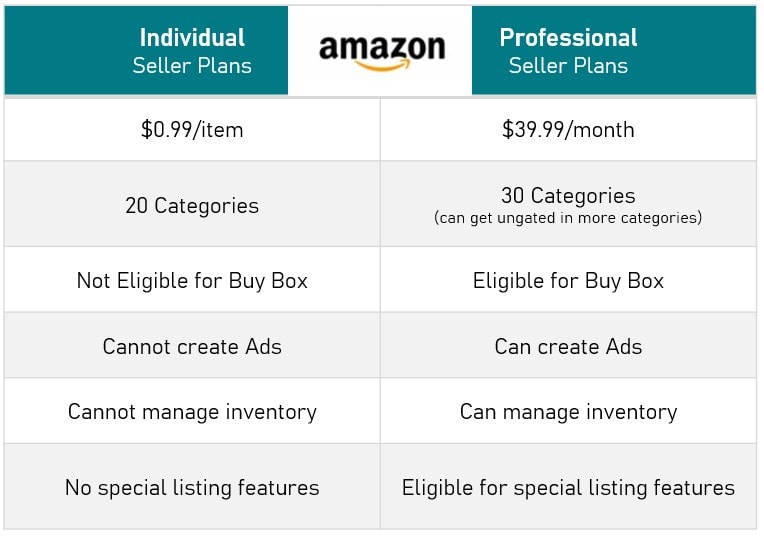
Second, you choose your selling plan. Amazon has two major selling plans:

  • Individual Plan: This is considered the plan for sellers who intend to sell somewhere below or around 40 items each month. There is a per-item fee, aside from the selling fees.
  • Professional Plan: For sellers who intend to sell more than 40 items each month. This plan features a monthly subscription fee, apart from other selling fees. This plan gives you access to more advanced tools and selling features.
Amazon Individual Seller vs Professional 
Comparison

Figure out your current and potential sales in order to decide which plan suits you best.

Step 3: Setting up Your Amazon Seller Account

First things first, go to the Amazon Seller Central website for your Amazon region (for example, sell.amazon.com in the US or sell.amazon.in in India) and sign up for an account.

You will need to provide details about yourself and your business, such as business name, business address, tax ID number (like GST in India or EIN in the US), bank account, and telephone number.

Make sure all of this information goes into the page correctly, and it should remain present and up to date. Also, during this initial setup, an Amazon seller account registration service might come in handy to avoid any errors.

Step 4: Amazon’s Selling Policies and Guidelines

Get hold of Amazon’s rules and regulations for sellers before you take your products to be sold. It deals with the product listing, pricing, shipping, customer service, as well as goods that are prohibited. If you want to keep your healthy seller account, compliance is the name of the game.

Step 5: Create Your Product Listings

This is where your products get displayed for potential buyers. Listings should include: 

  • Product Title: Use clear, concise, and keyword-rich titles to help customers find your product. Think about “how can I sell items on Amazon?” – using relevant keywords in your title is a big part of it.
  • Bullet Points: Outline your product’s most important features and benefits in use-case bullet points.
  • Product Description: Describe your product in detail with engaging writing, imparting dimensions, materials, and intended use.
  • High-Quality Images: Use images that are clear and well-lit, displaying the product from multiple angles.
  • Pricing: Set a price point that considers a balance between competitiveness and profit.

Keyword optimization will attract visibility to your listings. Perhaps you’d want to look into Amazon listing services should you need some expert help in writing compelling and SEO-friendly listings.

Step 6: Choose Your Fulfillment Method

There are two major processes for order fulfillment, FBA and FBM:

  • Fulfillment by Amazon (FBA): You send your inventory to one of the Amazon distribution centers. Amazon will keep your products in stock, pick, pack, and ship orders to customers, and handle the customer service for these orders. FBA can really cut down on your time and effort, and most customers prefer it.
  • Fulfillment by Merchant (FBM) or Seller-Fulfilled: This is done manually. The seller keeps the inventory, packs it, and ships it to the customer, handling customer service for them in the process.

In determining the method of fulfillment, consider your resources, shipping capabilities, and the amount of involvement you want to have.

Step 7: Advertise Your Products (Optional, but Recommended)

While free organic traffic can eventually work, Amazon advertising can be used to gain additional exposure, and new sellers certainly need it.

They have Sponsored Products, Sponsored Brands, and Sponsored Display advertisements.

Step 8: Manage Your Inventory and Orders

Manage your inventory so that you will not run out of stock. Process and ship every order immediately as per Amazon’s policy.

Provide good customer service, so that you can gain good fame thereafter. Good Amazon seller management is a key to long-term success. 

Step 9: Analyze Performance 

Regularly monitor your seller dashboard on Amazon Seller Central to track sales, customer feedback, and KPIs. Use the input data to drive improvements in your listing, pricing strategy, and overall business approach.

Expanding Your Reach: Amazon Global Selling 

If you have established the business in your primary marketplace, you could consider expanding internationally with Amazon Global Selling. This puts your business in the global customers’ realm. Amazon provides tools and resources to manage international listings, shipping, and compliance.

Conclusion

Learning how to sell on Amazon is not complicated. These few simple steps should take any beginner across the initial setup and into the start of their Amazon selling careers.

Always keep in mind: Research well, choose your products carefully, optimize your listings, and offer excellent customer service. With dedication and a strategic mindset, you will be able to tap into the gigantic potential of the Amazon marketplace and create a successful online business. Good luck!

Amazon Storefront- Escalate your Organic Sales


Enhancing Amazon Storefront Designs for Better Organic Sales on Amazon

One of the most renowned e-commerce retailers with an enormous seller and customer base. Are you selling on this vast e-commerce platform? Through Amazon Storefront you can stand out among 2.2 million active Amazon sellers. Opening an Amazon Storefront can help you differentiate your brand from your competitors and build customer trust. Amazon is truly the best place to highlight your unique value proposition.

An Amazon Seller Central Store is your own custom branded website on Amazon. Registered brands can showcase their products without distractions from competitors’ products or ads. With Amazon’s vast audience reach, it’ll have the look and feel of an e-commerce store. 

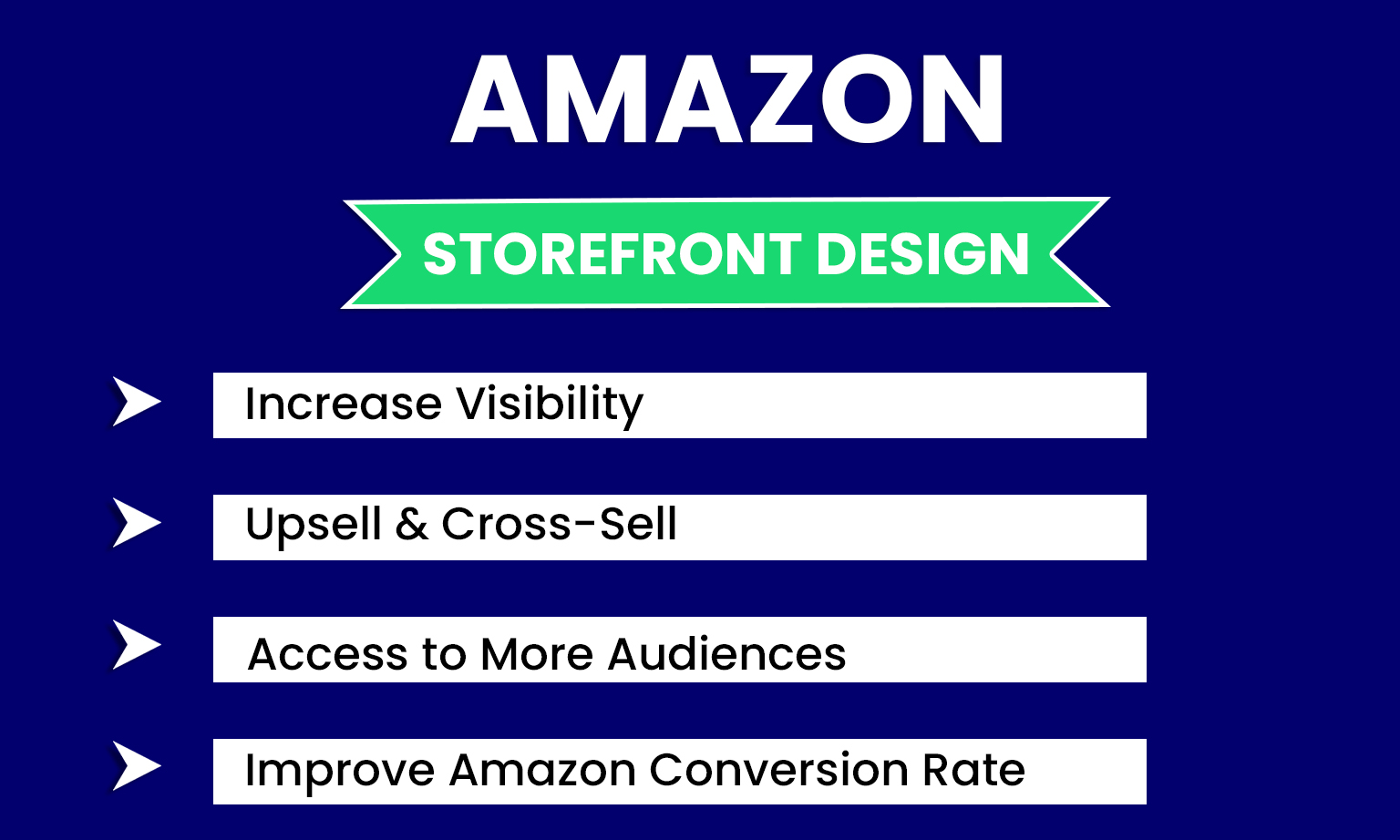
Are you building a Store? Amazon Storefront is a free self-service advertising tool. It is for creating a devoted brand destination on Amazon. It is an incredible way to showcase your top-selling products. Consequently, it increases brand awareness through an easy-to-navigate interface. These Storefronts provide small and mid-sized businesses with a platform for selling products.

HRL Infotechs has years of experience setting up a perfect Optimized Amazon Brand Storefront for clients. That aided them in surging their business and took their dollars higher.

Here are some best Practices to Upgrade Your Amazon Storefront:

  • Convey your story through your Storefront- Amazon organic sales Storefront is a unique but expressive way. Influence your customers through your brand’s story and rank them as top-selling products. 
  • Tailor your storefront design around customers’ pain points- You can design your Amazon Marketplace Store around the issues that trouble your customers the most. Because solving the problems is an eminent way to fascinate potential buyers. This way, you can meet maximum sales.
  • Cater to the type of customers you want to attract- Do a proper study about the behavior of your target audience on Amazon. Figure out their thinking process, likes, and dislikes. In this manner, you can throw a perfect and captivating storefront strategy to attract them.
  • Create sub-pages- Do not paste everything on your home page and mess it up; Instead, create a few sub-pages. Categorize better and arrange your products on various pages for easy navigation.
  • Truthful statements and clear CTAs- What is the best policy to gain customer loyalty? Most importantly, be honest with them to retain them long-term. It will make your customers buy from you again and again. Moreover, keep clear and visible Call-to-action buttons for ease for customers.
  • Attraction and engagement- Put compelling videos and photographs of your products. And put your products on multiple pages with categories and full-width images to optimize amazon organic sales brand pages. You can also show reviews on your brand page to capture customers’ attention.
  • Functional on mobile and desktop- Two-thirds of the searches are from mobiles. So, ensure your storefront is accessible from phones. It can enhance your customers’ experience and build a good brand image.

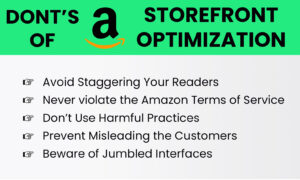
Don’ts of Amazon Storefront Optimization:

  • Avoid staggering your viewers- Make sure your store has easy navigation. Just keep it simple and accessible. Avoid creating confusing store designs for better engagement of your customer. 
  • Never violate the Amazon terms of service- Appropriately conducting business is the key to customers’ hearts. Abide by Amazon’s policy, or you would have to suffer severe consequences. That can even make your brand ineligible to sell on Amazon. 
  • Don’t use harmful practices- Protect your clientele to protect your enterprise. Indulging in harmful practices is an easy way to hurt your business reputation on Amazon. It will affect the confidence and trust of clients in you. Treat your customer’s data as confidential and Keep at arm’s length from unfair pursuits.
  • Prevent misleading the customers- If you do not wish to jeopardize your brand image, do not mislead them. Misguiding them can get you bad words of mouth. As it could reduce your rating, and you can also lose customer retention.
  • Beware of messy interfaces- Sometimes, the interfaces are all messed up, reducing engagement. Try to keep your store systematically arranged to narrow down the chaos. 

Amazon storefront optimization

Conclusion

Amazon Storefront is an appealing way to optimize brand pages with no competitors’ or ads presence. Refurbish your Organic Sales on Amazon. Highlight your eccentricity and what differentiates you from others. In other words, an optimized Brand Store page is the best way to customize your presence on Amazon.

Amazon store design

Refurbish your Amazon Marketplace Storefront by creating categorized sub-pages. Claim customers with nobility and exemplary practices, including clear CTAs on the pages. Besides this, there are a few things you need to keep away from to magnify your business presence on the leading platform. For instance, violating the terms of services or deluding the product buyer with unfair practices.

Get expert assistance at HRL Infotechs to win the lead and gain a competitive advantage with an optimized Amazon Storefront.

Absolute Guide to Commence an Amazon Seller Account


As Amazon consistently grows, opportunities to build an e-commerce business by selling on the site also grow. The latest trends stipulate that the year ahead holds enormous potential for e-commerce entrepreneurs in 2022.

By now, you might have worked through whether you want to sell on Amazon. Selling on Amazon brings plenty of benefits for you, which include:

  • Get More Customers
  • Low Starting Cost
  • Unbeatable Reach
  • Regularly Secure Payments
  • Services for Every Need
  • International Expansion
  • And appreciably more…


Why Become an Amazon Seller?


As an Amazon Seller, your products are available all day and night to crores of customers & businesses in India’s most visited shopping destination. Six lakh+ enterprises, big and small, sell on Amazon at present. If you’re grappling with whether to sell on Amazon or if you should stay on the platform, consider all these factors mentioned above.

Now you’re set to sign up as a seller. So what happens when you register? As an Amazon Seller, there will be lots of expectations from you. You must take a few prompt steps to prepare your store for the customers.
Let’s guide you to set up an Amazon Seller Account and assist you in accomplishing things you need to do before you list your first Amazon product.


Amazon Seller Account Requirements

After you’ve figured out what you plan on selling on Amazon, you’ll have to go through the Amazon seller registration process, which is pretty straightforward.


1. Sign Up for Amazon Account

It doesn’t matter which way you enter Amazon. Go to amazon services. You can sign up through a few different options too.


 2. Click on “Learn more”

Then reach the “Pricing” tab and click on “Compare selling plans.” It brings you to a comparison page to see the distinction between an individual and a professional seller account.

Note that clicking on the orange ‘Sign up’ button will immediately take you to the registration page for a professional seller. On the contrary, the ‘See pricing’ link exhibits the difference between the individual and professional accounts and permits you to determine which registration you want.


3. Opt Between an Individual or Professional Seller Account

Regarding Amazon’s seller plans, you again have two options: professional and individual. If you plan to sell around 40+ products per month, signing up as a ‘professional’ will be your most acceptable gamble.

Even though you’re selling just as a hobby and don’t regard yourself as a professional, this plan will help you save money.


4. Add Your Email id and Select ‘Create a New Account’

After selecting the best-seller plan, a window screen will appear asking you to type your email id and a password (of your will) for your account.

When you’re done typing, click the ‘Next’ button. It will take you to another screen, affirming you must accept the notification sent to the email address you provided on the initial screen. This way, Amazon confirms your email address.

Please pay attention to an email from Amazon, and approve the notification through the link they impart. Once you agree to it, you’ll be taken to the next screen accordingly.


5. Select Your ‘Business Location’ and ‘Business Type’

The next step is to create an Amazon business account and allocate the following information:

  • Business location
  • Business type
  • Full name

Subsequently, click the ‘Agree and continue’ button.


Become an Amazon Seller


6. Enter Your Personal Information

Afterward, you’ll need to provide Amazon with several personal details. It also includes a form of identification (your passport number or driver’s license).

After everything has been documented, click on ‘Next’ at the bottom of the screen. Ensure the address you’ve put in is correct since Amazon will send you a verification number on a postcard that you must enter before using your account. Again for authentication, you’ll need to provide your mobile number.


7. Enter Your Billing Information

Providing Amazon with your billing information will be your next step, including a genuine bank account number and a valid credit card number. Before proceeding, click on “I Understand.”

You will need to authenticate your bank account on the following page. Post confirming your banking details, you must enter your credit card details.


8. Put the Information for Your Product(s) and the Amazon Store

After supplying your credit card information and validation, you’ll answer a few queries about your Amazon store and the products.
To move on to the next phase of the seller registration process, you’ll need to answer the following:

  • Naming your Amazon store
  • UPCs for your product(s)
  • If any diversity certifications
  • If you’re the maker or brand owner of the product(s).

Clicking ‘Yes’/’Some of them,’ makes you answer: Do you own a government-registered trademark for the branded products you wish to sell on Amazon?
Push the ‘Next’ button once you’ve answered all the questions.


9. Identity Verification

Identity verification next, you’ll need to verify your identity by uploading images of your ID (license or passport) and a bank statement. After uploading them, click Submit.
Lastly, confirm the business address after completing all the other verification steps.

If the address is correct, a new screen will appear after clicking the confirm button. It elucidates you receiving a verification code postcard at that address and a verification code.
Then, after receiving the card, enter the code into the given space and finish the verification process.

Once you’re verified, you’re in!

Congratulations, Now you’re a verified Amazon Seller.