How To Create Amazon Storefront in 2024?


In the constantly changing world of online business, sellers on platforms like Amazon must have a strong presence. One essential tool for this is the Amazon Storefront. This guide is here to help you figure out how to make a unique Amazon Storefront in 2024. It talks about the important stuff, gives you a step-by-step plan, and points out how services like Amazon Storefront design services can make your storefront better and help you sell more.

What is an Amazon Storefront?

An Amazon Storefront is like a carefully designed section where sellers can show off their products in a unique and personal way. It’s not just a regular page; it turns into a really interesting place. Here, customers can look through the seller’s collection, learn about the brand’s story, and find a specially chosen set of featured products. Think of it as a digital haven that captures what the seller offers in a cool and interactive online experience. 

Amazon Storefront Requirements:

Before embarking on the creation journey, it’s vital to grasp the prerequisites for setting up an Amazon Storefront:

Amazon Seller Account:

The primary and crucial step is to possess an active Amazon Seller Account. If you’re just starting to sell on Amazon, the first thing to do is sign up. You’ll need to go through the steps to register, but this is the first important step to become a seller on Amazon. It sets the groundwork for you to be on the platform and gets things ready for you to create your storefront.

Brand Registry:

Although not obligatory, participating in the Brand Registry program amplifies a seller’s capabilities within the Amazon ecosystem by offering supplementary tools and features to safeguard intellectual property.

Products:

A range of listed products on Amazon is essential. A thoughtfully curated selection enhances the attractiveness of your storefront and captivates potential customers.

How to Create an Amazon Storefront?

Now, let’s explore the systematic procedure for bringing your Amazon Storefront into existence:

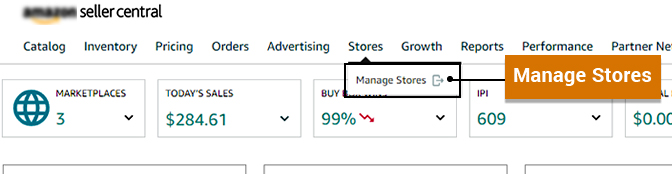
  • Sign in to Your Amazon Seller Account: Sign in to your Amazon seller account and click on “Stores” in the “Advertising” menu.
  • Choose a Store Template: Amazon provides diverse templates, each offering a unique layout. Opt for a template aligned with your brand identity and the nature of your products.
  • Customize Your Storefront: Tailor your storefront by incorporating your logo, brand visuals, and product listings. Craft engaging copy and employ compelling visuals to narrate your brand story.
  • Create Store Pages: Amazon Storefronts allow for the creation of multiple pages. Organize your products into relevant categories, facilitating seamless navigation for customers.
  • Add Products: Fill up your storefront with all your different products, especially the ones that sell the best, the new arrivals, or any special deals you have. Use really good pictures and give detailed descriptions of your products. This not only gets customers interested but also increases the chances of turning their interest into actual purchases.
  • Utilize Brand Widgets: Amazon provides brand widgets for interactive elements like featured products and image carousels. Strategic utilization enhances the overall user experience.
  • Preview and Publish: Before going live, leverage the preview feature to visualize how your storefront will appear to customers. Once satisfied, hit “Publish” to make your Amazon Storefront accessible to shoppers.

How HRL Helps You:

To unlock the full potential of your Amazon Storefront, consider the expertise of specialized services such as Amazon Storefront design services offered by HRL:

  • Professional Design: HRL’s Amazon Storefront design services ensure a visually appealing storefront aligned with your brand identity, influencing how customers perceive your brand and products.
  • Optimized Layout: HRL experts focus on an optimized layout for enhanced user experience, strategically organizing your storefront for seamless navigation.
  • Engaging Content: Crafting engaging and persuasive content is crucial, and HRL helps in creating content that effectively narrates your brand story and encourages customer purchases.
  • SEO Optimization: HRL incorporates SEO best practices to enhance discoverability, employing relevant keywords and optimizing product listings.
  • Start Building Your Amazon Storefront: Armed with the understanding of how to create an Amazon Storefront, take the next steps by signing into your Amazon Seller Account. Choose a template, personalize your storefront, and start constructing an engaging shopping environment that mirrors your brand’s identity.

Whether you’re a novice seller or a well-established brand, an Amazon Storefront can make a significant impact. Utilize its potential to engage with customers and boost sales with amazon storefront design. 

Conclusion

In conclusion, crafting an Amazon Storefront in 2024 is a strategic move for sellers aiming to establish a robust online presence. Follow the outlined steps, meet the requirements, and consider professional services like Amazon Storefront design services to ensure your storefront stands out and effectively boosts sales.

Elevate your Amazon Storefront with professional design services. Discover how HRL’s Amazon Storefront design services can enhance your brand’s visibility, engage customers, and ultimately boost sales. Take the initial step toward creating a compelling and successful Amazon Storefront.
Amazon Storefront Creation and Management Services for Sellers and Vendor


With thousands of sellers and a massive customer base, Amazon has been the most popular eCommerce platform among retailers and buyers. However, with new sellers entering this marketplace, the competition is getting tougher with each passing day. It is vital to think over the conventional techniques and utilise the power of extraordinary features that amazon offers to stay on the top and get the most out of this potential platform.

You must have heard, implemented, and benefited from enhanced brand content. One of the similar ways to reach greater positions and give an immersive visual experience to your customers is through Amazon storefront design.

So, now you must be wondering how to get started with Amazon storefront creation and management. Don’t worry; we have got your back. The blog deals with detailed steps to creating Amazon storefront and Amazon store management services.

Why is Amazon storefront creation and management essential?

Amazon Storefront is a simple drag-and-drop product that allows the creation of multi-page stores to display value propositions and products on Amazon. With these customisable pages, one can showcase a single or group of items, including videos, texts, and other types of content. Amazon Store surges the buyers’ experience by:

  • Offering an enhanced mobile and desktop experience
  • Leveraging both external and internal sources of traffic 
  • Boosting organic ranking on amazon search engine
  • Introducing the brand to newer audiences and promoting products to pre existing customers 

Are you Eligible for Creating an Amazon Storefront?

Enrolment in the Amazon Brand Registry program is essential for Amazon storefront creation and management. The entire process of setting up a store is easy and free for sellers, vendors, and agencies. 

How to cCreate Amazon Storefront Design?

Embark on the journey of Amazon storefront creation and management with these steps.

Step 1: Sign Up for a Professional Seller Account

The first step towards Amazon storefront creation and management is signing up for a professional amazon seller account. You need to provide basic details, including name, business contact details, email address, password, and payment information. Along with this information, amazon asks for your credit card details to charge the monthly fee of $39.99. Note that you must have the US back account number for payment. 

Step 2: Register with Amazon Brand Registry

Once you get the approval for a professional selling account, the next step is applying for Amazon Brand Registry Program (ABR). The Amazon Brand Registry program provides various tools to improve the brand on Amazon, including enhanced advertising and marketing features, access to restricted selling categories, and professional presentations.

Step 3: Start Designing the Store

You can start creating your store as soon as the brand is registered with Amazon Brand Registry. For this, you can choose either way:

  • Log in to seller central > Stores > Manage Stores
  • Ad Console > Stores > Create Store
create storefront

Step 4: Build Home Page

The home page is the first page customers will see on visiting the store. Creating a home page requires:

  • Brand Display Name & Logo: You need to write your brand name and upload the logo with high quality.
  • Page Meta Description: Make your meta description informative and catchy. It is a vital part of the store as it helps rank your amazon store and, at the same time, gives visitors a preview of your products and brands.
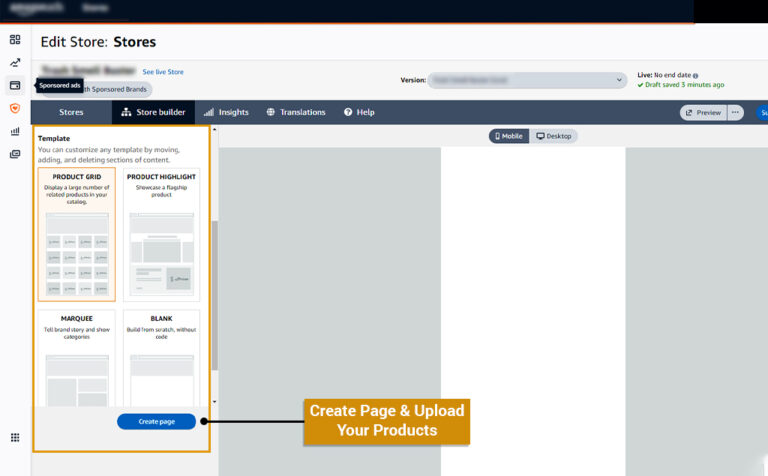
  • Templates: Product highlight, product grid, and marquee are some templates that amazon provides so that you can creatively narrate your brand’s story, highlight your best-selling products or display all products altogether in one grid. Moreover, you can even start from scratch by choosing a blank page template.
storefront templates

Step 5: Create Additional Pages

After building the home page, it is time to create additional pages depending on the discount, deals, best-selling products, catalogue categories and more. It is important to note that you design pages in such a way that navigation within the page or to other pages is easy so that the visitors can easily get what they are exactly looking for without investing time and effort. 

Step 6: Addition of Content Tile to Every Page

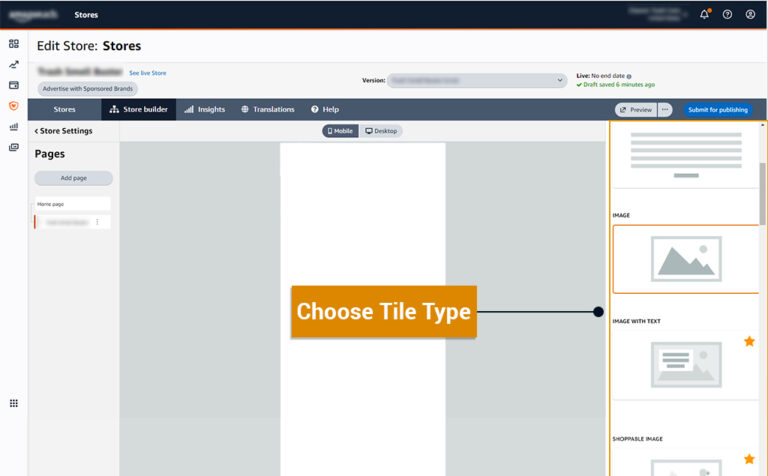
Set the proper hierarchy of pages and then add content tiles to these pages. Content tiles include images, videos, galleries, titles, product grids, and navigation.

storefront content tiles

Step 7: Upload Your Products

Once the design layout of additional pages is ready, you can add the product by assigning Amazon Stand Identification Number (ASIN to every product. You just need to copy-paste the respective ASIN.

Step 8: Check the Preview and Submit

You can click on the store preview option to check how your store will appear on desktop and mobile. Thoroughly check spelling mistakes, image or branding inconsistencies, grammatical errors, content titles, product images and navigation issues. Once done, submit the store page to Amazon for review. The store will get automatically published once the review is done. 

How to manage an Amazon Brand Store?

Amazon understands the need for continuous store optimisation and thus allows sellers to upgrade and edit their store pages to maximise their chance of success. 

Amazon brand store management services include: 

  • Auditing the store frequently and taking required actions to drive brand awareness and sales. 
  • Working on design and layout to offer a top-notch user experience. 
  • Showcasing the products and brand in a way that compels visitors to take action. 
  • Optimising your product subcategory and category classification. 
  • Creating compelling though SEO-optimised product descriptions 
  • Continuously researching new trends, monitoring and updating the product data when required.

Due to time constraints, many sellers do not pay heed to Amazon store management and land with poor sales and revenue. HRL Infotechs, the top storefront consultancy, has got your back! We have a dedicated team of professionals who can help you manage your storefront efficiently. They conduct in-depth research about trends and competitor stores to create an optimisation strategy that makes you stand out from the crowd and enjoy better sales.